THIS WEBSITE USES COOKIES — LEARN MORE — Dismiss
Classic brass synth sounds reborn with grit and character. Brass pushed through tape machines, guitar pedals, dusty hardware and modular rigs.
Bone Chain
INSTRUMENTS
200
SAMPLES
2355
SIZE
4.7 GB
VERSION
1.1
€38Add to cart
From sustained brass patches that linger, to classic stabs that rattle like a rusty blade, and warbly drones humming, Bone Chain delivers a full arsenal of brass-inspired synths with the signature of tape and vintage hardware.
*
Deconstructed tapemachine-sounding brass synths.
Destroyed brass sounds, from sparkling dance hooks to mishandled deep-end synth brass, made organic with amps, mics and tape.
SCULPT [FX] engine boasts an innovative and sophisticated randomizer system, capable of generating fresh sets of sounds.
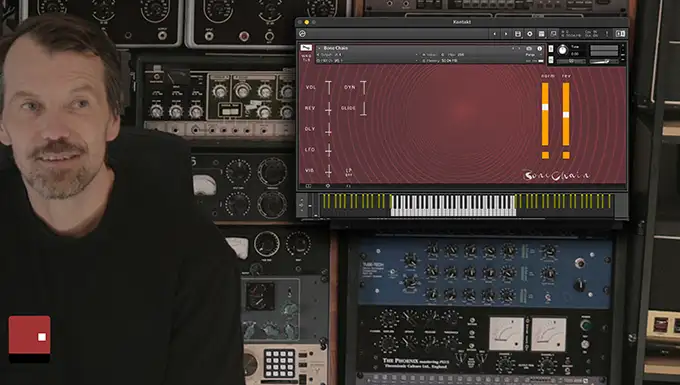
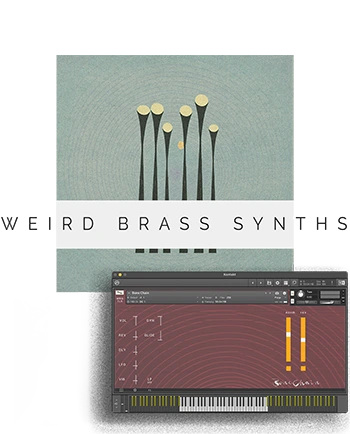
The user-friendly interface grants effortless access to an array of controls and effects.
200 taped analog brass synth kontakt patches
Recorded through amps, tapemachines and hardware effects
Sound Design Instruments
Majestic Textures
Droning deep notes
Impulse Responses
Sound Sculptering with XY pad
Sample-Start Slider
Upto 3 somber brass synths in each patch- for you to blend
BoneChain contains messed-up brass-synths, that will blossom with the modwheel
From sinister brass lows that add grit and intensity, lush sustained brass pads, to distorted trumpet, wobbly brass stabs and shorts.
Modern sounding flexible brass sounds, programmed for Kontakt, put into an intuitive user interface
Use Modwheel to let the textures change colour and density on the cinematic patches marked [mw]
Use the [FX] presets for pathways to unique sound design
save precious screen space or expand the user interface
buy now, download later or instantly
PATCHES WITH A EPIC AND MEATY BIG NATURE
Bone Chain is a tape-processed brass synth library for Kontakt. It blends analog brass synth tones with tape saturation, amp color, and modular filtering — resulting in a raw, cinematic, and often unpredictable sound palette perfect for weird hiphop, scoring and experimental music production. A lot of genres really.
BONE CHAIN sounds ranges from synth-infused prominent fanfares… to brazzy fluttery Nordic noir tape textures.
Bone Chain combines brass-inspired analog synthesis with mangled signal chains — including tape machines, guitar pedals, amps, and modular rigs. The result is a library full of textures that are bold, broken, lush, or distorted — sometimes all at once.
It consist of taped analog brass synth kontakt library made from classic brass sounds and stabs. Recorded through tapes, amps, and vintage hardware to bypass the typical digital or harsh feel associated with brass synths.
It spans over all sorts of brazz sounds. Our favourite patches are the more ‘somber’ molded brass patches. Those that you can easily blend into more neo-classical styles, and easily use in filmscoring.
Bone Chain includes a 10 categories set of brass-synth patches ranging from sustained textures and sharp stabs to evolving pads and warbly drones. These are not clean multi-samples — each patch has been sculpted and degraded through analog gear to add life and grit.
No — and it’s not trying to be. Bone Chain is for composers and producers who want brass-inspired synth tones with character and imperfection, not orchestral realism. Think of it as a tone-shaping tool for dark scores, lo-fi textures, and retro-futuristic moods.
The library requires the full version of Full Retail Version of Kontakt 6.4.2 [or later]. It will not run in the free Kontakt Player. If you’re unsure about compatibility, see our general Kontakt compatibility guide.
First install the lib. Download the ZIP file from your email link or user account.
Extract the folder.
Open the .nki files in Kontakt via the Files tab.
You’re ready to score glaciers and blizzards.
Need a step-by-step guide? Follow our installation instructions here →
It will take up 4.7 GB of free diskspace on your harddisk
To find out which version of a Wrongtools library you have, – click on the BOOK icon located in the bottom-left corner of the Kontakt instrument interface – in a patch. The version number will be displayed at the bottom right of the window that pops up.
Checking for Updates: You can check the Wrongtools site for the current version number of the library, as shown in their documentation (e.g., v1.1, v2.1).
How to Update: You must download the library again from your original purchase link, which is always updated to the latest version – you’ll also find it in your-account
Replacing Files: Once downloaded, replace the old folder with the new one.
It is recommended to keep a copy of the old files until you are sure the new version works.

v1.1 :: update — changelog [build 207 / sc 0011]
v1.0 initial release
*with patches recorded through amps or tape machines*
Join our narcissistic mailing list for occasional news, bad puns and free kontakt library curiosities ONCE OR TWICE A MONTH.